 Animated Maps
RigLogic's animated maps: [0, 1] mask values from control values, for shaders, or unclamped step tables.
| Node type | RigExecAnimatedMaps |
| Example | animated_maps.usda |
On this page:
Overview
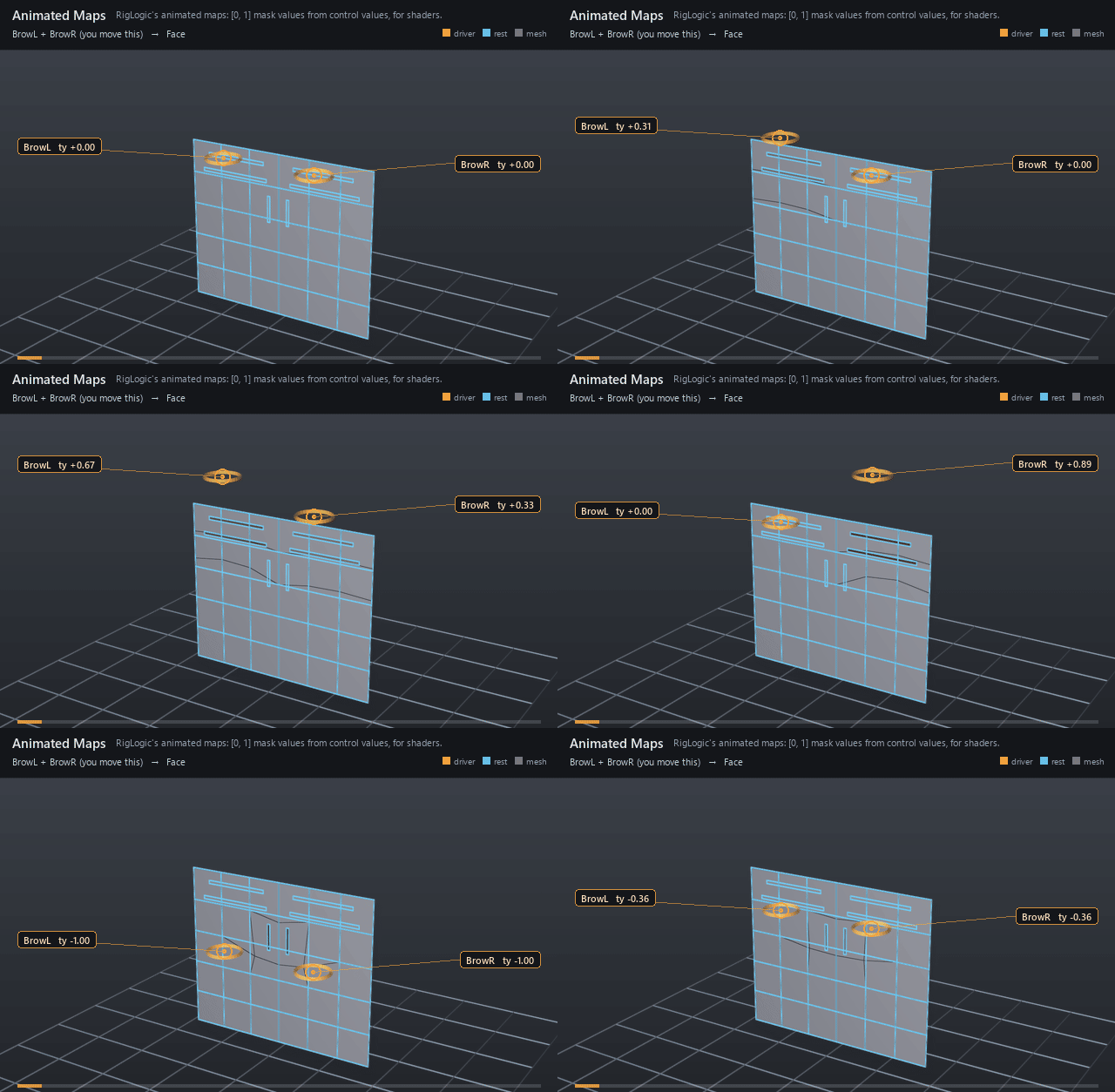
Animated maps turn control values into texture-mask intensities --
the wrinkle maps a face shader blends in as a brow raises. Each
RigExecAnimatedMap child is a conditional table over the input properties;
its value is published on outputs:value, connectable like a pose weight, and
as a constant float primvar on every rigExec:meshes target so a shader can
read it. The tables are Epic Games RigLogic's, ported from OpenRigLogic (MIT,
RigLogic 13.5.0); see algorithm references and
RigLogic behaviours.
RigLogic's animated maps (Epic Games OpenRigLogic, see docs/references.md): one value per RigExecAnimatedMap child, each a sum of piecewise-linear segments of the input properties, clamped to [0, 1] unless the child's rigExec:clampOutput is false. Made for driving texture masks such as wrinkle maps; unclamped slope-0 rows make a step table that can carry any value.
Like a pose interpolator it is not a mover: it publishes a float per child on outputs:value, which a RigExecBlendInput's inputs:weight or any reader of a pose weight can connect to. For shaders, each map is also published as a constant float primvar on every rigExec:meshes target, named by its rigExec:primvarName. The primvar is display output: it reaches Hydra and is never written to the stage.
How it works
The node runs in the pose domain like a pose interpolator. Each
row of a map reads one input x and adds slope * x + cut when x lies in its
[from, to] interval (a reversed interval is swapped); among consecutive rows
on the same input only the first matching interval contributes, so
neighbouring segments that share an endpoint count it once. The sum is clamped
to [0, 1] (libs/rigExecMath/conditionalTableKernel.h), RigLogic's rule,
unless the map's rigExec:clampOutput is false: then the sum is published as
is. Each map's value is published on its outputs:value and copied to
<mesh>.primvars:<rigExec:primvarName>, which imaging hands to Hydra as a
constant float primvar and never writes to the stage. A glslfx shader sees it
only if its attributes block names it.
Step tables. A map whose rows all have slope 0 is a step function of its
input: each row is one cell [from, to] and its rowCut is the cell's value.
With rigExec:clampOutput false the value can be anything, so the map can
drive a property mover's inputs:value or a blend input with an angle, an
offset or a frame number, not only a [0, 1] weight. Two rules make such a
table exact:
- Ties go by row order. Cells that share a bound both hold it, and within a group of consecutive rows on the same input only the first matching row counts, so list the row that should win the shared bound first.
- Bounds are floats (
float[]), while the input is read in its own precision (a double stays a double). Round a shared bound that is not a float toward the losing cell (up when the winner is the lower cell, down when it is the upper one): the winner's row then holds the exact bound, so an input exactly at the tie still goes to the winner. Only inputs between the exact bound and its float, less than one float step wide, change cell.
Outer cells that run to the float limits (-FLT_MAX, FLT_MAX) hold the end
values out to those limits; an input beyond them or a NaN matches no row and
reads 0.
Disabling the node publishes 0 on every map, step tables included.
Wiring
| Relationship | Points to | Required |
|---|---|---|
rigExec:driverAttributes |
The float or double input properties rows index. | yes |
rigExec:meshes |
Meshes that receive every map as a primvar. | no |
RigExecAnimatedMap children |
One per map. | yes |
Parameters
Node parameters
rigExec:driverAttributes
Relationship.
The input properties, float or double, in order: a row's rigExec:rowInputs entry is an index into this list.
rigExec:meshes
Relationship.
Meshes that receive every map as a constant float primvar,
primvars:
inputs:enabled
Type: bool. Default: true.
Shape-preserving enable. Disabled maps publish zero.
Example
Two brow controls slide in ty from -1 (lowered) to 1 (raised). The
Wrinkles node reads both and publishes three maps. foreheadL and
foreheadR are one row each, slope 1 over [0, 1] on their own brow. frown
has a row per brow over the reversed interval [0, -1] with slope -0.6, so one
lowered brow reads 0.6 and both clamp at 1. Each map's outputs:value is
connected to a blend channel on the face card, so the brows lift and knit
with the maps. Every map is also published as a constant float primvar on each
rigExec:meshes target; the wrinkle-line cards read theirs through a
UsdPrimvarReader_float into UsdPreviewSurface opacity, so the lines fade
in wherever scene materials are drawn, and nothing is written to the
stage.
Open it live with:
Re-render the GIF above with:
Tips
- Rows on the same input should be consecutive and ordered: only the first interval that holds the input counts within such a run.
- Rows, inputs,
rigExec:clampOutputand meshes are compiled rig identity; the inputs' values are per-frame inputs. - Disabling the node publishes zero on every map and primvar.
- A step table that carries several values per cell is one map per value, each with the same rows and its own cuts.