 Surface Mover
Drapes points onto an animated driver surface.
| Node type | RigExecSurfaceMover |
| Example | surface_mover.usda |
On this page:
Overview
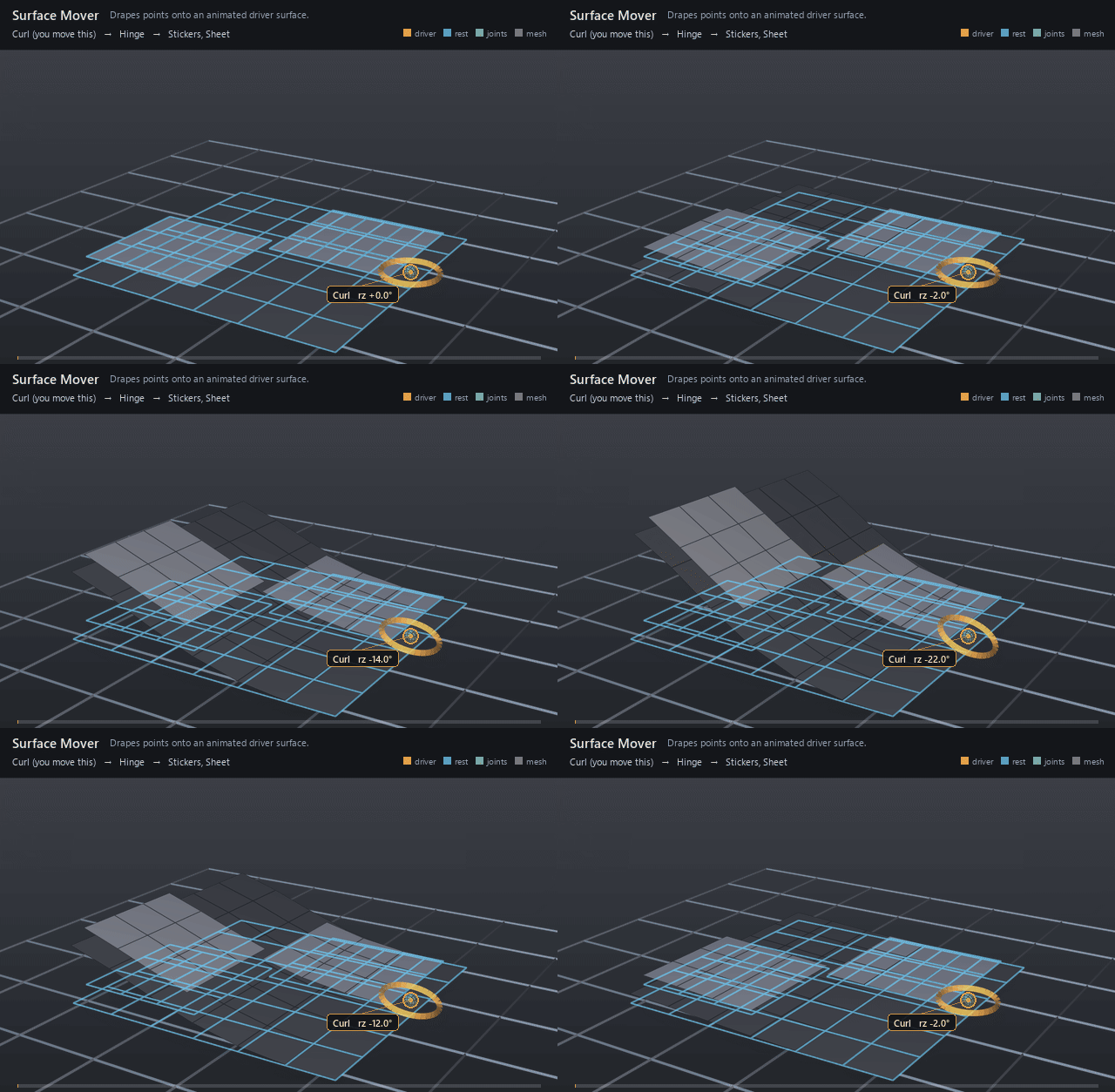
Conforms sticker patches to a moving mesh: every moved point is pulled
onto the closest point of the driver's triangulated surface, and the
common envelope blends that contact back over the incoming points. Use it
for decals, clothing patches, and anything that must finish flush against
deforming skin. In v0.1 rigExec:mode selects no numeric difference —
attach and project both project at full strength — so the mover is a
contact pass, not a slide-along-the-surface follow.
Snaps each target point to the nearest point on the driver mesh's triangles (the rigExec:surface points with its faceVertexCounts and faceVertexIndices, or rigExec:triangles) as rigExec:snapMode and rigExec:offset direct, and writes exact native UsdGeomPointBased points properties. rigExec:surface honors rigExecReadPhase metadata. rigExec:mode is not read: every surface mover projects. Persistent attachment is RigExecSurfaceBindingMover.
How it works
The mover is one revision in its target's point chain, so it runs in
the mover-application walk after solving and after every earlier revision
on that chain. It reads the driver prim's points at
the rigExecReadPhase declared on rigExec:surface plus its
faceVertexCounts /
faceVertexIndices, fans every face into a triangle fan, and takes the
closest point over all of them per moved point; the envelope then blends
that candidate over the incoming revision, and the compiler re-synthesizes
authored normals and extent afterwards. The search carries no
frame-to-frame state, so a point roughly a facet away from the driver
tracks it smoothly while a point far away can flip between near-tied
facets and pop.
snapMode supports onSurface, inside, outside, and outsideSurface.
offset measures distance in surface-local space; mask blends each target
point independently. Explicit triangles preserve a source application's
tessellation. surfaceMatrix and targetMatrix, optionally followed by the
two frames providers, define local/common point conversion and the nearest
point metric. Directional projection and above-surface normal projection
are not implemented by these nearest-surface settings.
.rigexec exports carry these settings from format revision 21. A revision
20 file has none of them and plays the legacy closest-point snap.
Wiring
| Relationship | Points to | Required |
|---|---|---|
rigExec:surface |
Native mesh prim supplying the driver surface; without exactly one, compile sets the mover aside with a warning and the rest of the rig still runs. | yes |
rigExec:moves |
Exact points property to drape. | yes |
rigExec:surface rigExecReadPhase |
Metadata: base for the driver's authored points, final when the driver is itself rigged. |
no |
Parameters
Common mover envelope
rigExec:moves
Relationship.
Reserved write-set relationship: exact prim/property targets.
inputs:enabled
Type: bool. Default: true.
Shape-preserving enable. Disabled movers pass their preceding revision through unchanged (value-only edit).
inputs:defaultWeight
Type: float. Default: 1.
Normalized common mover envelope in [0, 1]. With no bound rigExec:weightObject it broadcasts over every logical element: zero passes the incoming value through bit-for-bit and one applies the mover's full-strength result. A non-finite value or one outside [0, 1] passes the incoming value through with a diagnostic.
rigExec:weightObject
Relationship.
Optional compatible total weight field, at most one target. When bound, the weight object's values (including its own sparse or constant fallback) supply the common envelope instead of inputs:defaultWeight. Target, domain, and cardinality must match each mover application; an incompatible binding is a compile error. A multi-target mover may bind only a constant operation envelope whose weightTarget is the mover prim itself; that one value broadcasts to every application of the atomic mover.
Node parameters
rigExec:surface
Relationship.
Native mesh prim supplying the driver surface.
rigExec:mode
Type: uniform token. Default: "attach".
Valid values: attach, project.
rigExec:snapMode
Type: uniform token. Default: "onSurface".
Valid values: onSurface, inside, outside, outsideSurface.
Nearest-triangle snap policy. Inside/outside retain points already on the required side with at least the declared clearance.
rigExec:offset
Type: float. Default: 0.
Side clearance measured in surface metric coordinates, independent of the mover envelope.
rigExec:mask
Type: float[]. Default: [].
Optional target-vertex weights in [0,1]; empty affects every vertex.
rigExec:triangles
Type: int[]. Default: [].
Optional explicit surface vertex-index triples. Empty uses each polygon's fan triangulation about its first corner.
rigExec:pointSpace
Type: uniform token. Default: "local".
Valid values: local, common.
Local arrays use their respective matrices. Common arrays already share coordinates and are both mapped into the surface metric before querying.
rigExec:surfaceMatrix
Type: matrix4d. Default: ((1,0,0,0),(0,1,0,0),(0,0,1,0),(0,0,0,1)).
rigExec:targetMatrix
Type: matrix4d. Default: ((1,0,0,0),(0,1,0,0),(0,0,1,0),(0,0,0,1)).
rigExec:frames
Relationship.
Optional surface and target rest-to-pose providers: none, or exactly these two in that order, applied after their local-to-common matrices. A checkpoint read phase is a compile error.
Example
A 6x6 quad sheet hinges up about its camera-right edge and back under
one avars:rz control, and two sticker patches sharing one mesh ride it,
floating 1.4 above the sheet at rest. FollowSheet carries the patches
roughly along with the same joint through a per-point weight, and
DrapeStickers then projects them onto the sheet read at final, which
is why the drape stays smooth: every sticker point starts within a facet
of the surface. The 0.75 envelope stops each patch a steady distance
above the sheet rather than landing it coplanar, which is what keeps it
out of a z-fight with the surface it landed on — and what you see moving
is that standoff staying parallel to the sheet as the sheet bends away
underneath it. FollowSheet is nested inside DrapeStickers and
BendSheet is authored last, because movers run in reverse composed
namespace order with descendants ahead of their parent.
Open it live with:
Re-render the GIF above with:
Tips
- Keep the moved points close to the driver — roughly a facet or less. The closest-point search runs per point per frame with no continuity, so distant points sit on near-ties between facets and jump when the winner changes; a rough matrix-mover follow ahead of the drape is the fix.
- Read the driver at
finalwhen the driver mesh is itself moved by the rig, and atbasewhen it carries authored point animation;baseon a rigged driver drapes onto the undeformed surface. rigExec:modeis inert in v0.1: the kernel pins the operation to full-strength projection for both tokens, soattachdoes not yet transport points along the surface. Shape the result with the common envelope instead — below 1 it leaves a standoff and stops the patch z-fighting with the surface it landed on.