Marking menu
Right-click in the viewport while controls are selected, or over a control, and a radial menu replaces usdview's own right-click menu. A TouchPose region counts as its control: it is just a bigger target.
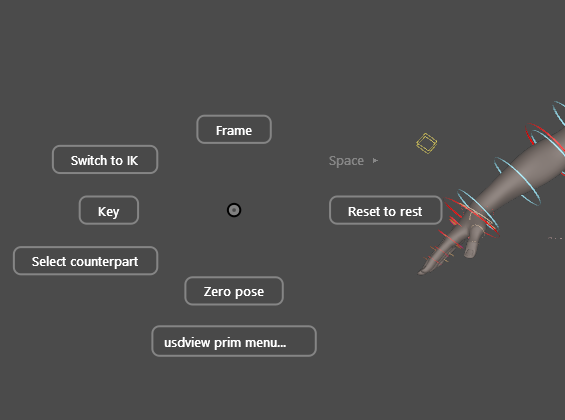
Three ways to use it
Flick. Press, flick toward a direction and release. The command runs without the menu ever being drawn: once your hand knows the directions, this is the fast path.
Hold. Keep the button down and the ring appears around the cursor. Release over an item to run it.
Tap. A quick press and release leaves the ring up to be clicked. Escape, or a click away from it, dismisses it.
A label, or a row of the column below the ring, wins whenever the cursor is on it, whether you are holding or clicking.
What it acts on
The menu acts on the selection. Right-clicking a control that is not selected selects it first, so what the menu acts on is always what is highlighted. With nothing selected and no control under the cursor, the right-click stays usdview's, and Alt + right-drag is still the camera's zoom.
The Selection menu
| Direction | Item | Does |
|---|---|---|
| West | Key | Key every posed channel of the selection at the current frame. |
| East | Reset to rest | Put the transform channels back to rest, keyed in animation mode. |
| South | Zero pose | Clear every pose channel (IK/FK, spaces, rolls as well as transforms), as the picker's Zero Ctrls does. |
| North | Frame | Frame the selection. |
| North-West | Switch to IK / FK | Switch the selection's limbs, matched. See limbs. |
| North-East | Space ▸ | The control's named spaces, the current one checked. Switching keeps the control where it is. |
| South-West | Select counterpart | Select the mirrored control (L_ and R_, _l_ and _r_, and the like). |
| Below the ring | usdview prim menu… | usdview's own right-click menu for the control. |
Items that do not apply are hidden while you flick, and greyed out once the ring is up to be read.
Submenus
A submenu (Space, for example) opens around a new centre and leaves a round ‹ circle where its parent was, with a dashed trail between them. Move back onto the circle to return to that menu; with several levels open, every parent leaves a circle, and returning to one closes every submenu below it.
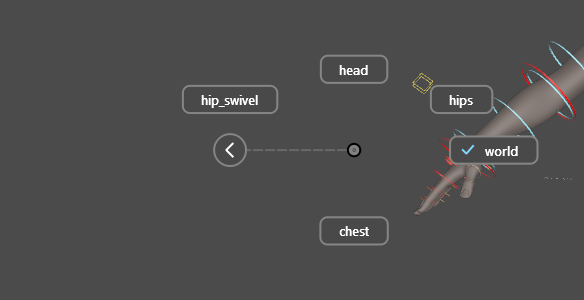
A back circle never sits inside a submenu's ring or under one of its buttons: a submenu opens far enough out to clear every parent, and leaves empty any direction whose label would reach a circle.