 Float Math Mover
Arithmetic on one scalar channel: add, clamp, remap, blend, curve, quantize, path.
| Node type | RigExecFloatMathMover |
| Example | float_math_mover.usda |
On this page:
Overview
The property domain's calculator: it revises an exact float or double attribute
— a blendshape weight, a blend factor, an envelope — instead of geometry.
The everyday job is unit plumbing. A channel arrives in whatever range the
department upstream authored it in, and remap divides it down into the
0 → 1 a weight expects; clamp, add, multiply and blend cover the
rest. remap deliberately does not bound its result, so a clamp mover
after it is what keeps an overshoot from driving a shape past its target.
Two operations serve walking rigs. quantize rounds a distance down to a
stair of step inputs:value through inputs:min: a gait cycle's start, at
any distance. path samples a UsdGeomBasisCurves (named by
rigExec:path) by arc length at the incoming distance less
inputs:value, returning a coordinate, the tangent's heading, or the
curve's end; a local rigExec:pathOffset turned by the heading places a
foot's landing beside the path. See
Paths and walking.
Statically typed add, multiply, clamp, remap, blend, curve, quantize, or path over one exact float property target, or a double one such as a control's avar, which the mover computes in float.
The revision is r = op(incoming), then the common MoverAPI envelope mixes it back over the incoming value. Zero is a pass-through and one applies the operation outright -- the same rule every mover follows.
add and multiply apply inputs:value, clamp reads inputs:min and inputs:max, and blend returns inputs:value, so the envelope mixes toward it.
remap normalizes from [inputs:min, inputs:max] to [0, 1] and does NOT clamp; compose a clamp mover after it to bound the result.
curve maps the incoming value through inputs:keys, piecewise linear between keys (a cubic Hermite when inputs:tangents is authored) and extrapolated linearly past the first and last key.
quantize rounds the incoming value down to inputs:min + k * inputs:value for the largest integer k that does not exceed it: a stair of step inputs:value through inputs:min. A step that is not positive passes the value through.
path samples the curve rigExec:path names at arc length (incoming - inputs:value), clamped to the curve, and returns rigExec:pathComponent of it. inputs:value is the distance the curve's first point stands at, so a moving window of points keeps one distance clock.
How it works
A math mover's inputs live on the mover itself, and the chain's
base is the target attribute's own authored value. The compiled graph
orders the property chain before every operation that reads the revised
attribute, and those operations read the chain's result — which is how a
normalized weight reaches the blendshape mover or solver that reads it
instead of being recomputed inside that kernel. Each revision computes
r = op(incoming) and mixes it back through the common envelope
(incoming + defaultWeight × (r − incoming)), so zero passes the incoming
value through and one applies the operation outright. Movers sharing one
target revise it in mover-stack order: a reversed namespace walk, each
parent after its children, so the last sibling listed runs first.
Wiring
| Relationship | Points to | Required |
|---|---|---|
rigExec:moves |
Exact float or double property to revise; exactly one. | yes |
rigExec:path |
The path operation's curve: one UsdGeomBasisCurves prim holding one linear, bezier, bspline or catmullRom curve, nonperiodic or pinned. | for path |
Parameters
Common mover envelope
rigExec:moves
Relationship.
Reserved write-set relationship: exact prim/property targets.
inputs:enabled
Type: bool. Default: true.
Shape-preserving enable. Disabled movers pass their preceding revision through unchanged (value-only edit).
inputs:defaultWeight
Type: float. Default: 1.
Normalized common mover envelope in [0, 1]. With no bound rigExec:weightObject it broadcasts over every logical element: zero passes the incoming value through bit-for-bit and one applies the mover's full-strength result. A non-finite value or one outside [0, 1] passes the incoming value through with a diagnostic.
rigExec:weightObject
Relationship.
Optional compatible total weight field, at most one target. When bound, the weight object's values (including its own sparse or constant fallback) supply the common envelope instead of inputs:defaultWeight. Target, domain, and cardinality must match each mover application; an incompatible binding is a compile error. A multi-target mover may bind only a constant operation envelope whose weightTarget is the mover prim itself; that one value broadcasts to every application of the atomic mover.
Node parameters
rigExec:operation
Type: uniform token. Default: "clamp".
Valid values: add, multiply, clamp, remap, blend, curve, quantize, path.
inputs:value
Type: float. Default: 0.
inputs:min
Type: float. Default: 0.
inputs:max
Type: float. Default: 1.
inputs:keys
Type: float2[]. Default: [].
(input, output) keys for the curve operation, strictly increasing in input. One key is a constant output.
inputs:tangents
Type: float2[]. Default: [].
Optional (in slope, out slope) per key for the curve operation. Empty is piecewise linear, extrapolated along the end segments; authored, the curve is a cubic Hermite through the keys, extrapolated along the first in slope and the last out slope.
rigExec:path
Relationship.
The path operation's curve: exactly one UsdGeomBasisCurves prim holding one curve, linear or cubic (bezier, bspline or catmullRom), nonperiodic or pinned. Its points are read as authored, in the rig's space, and are an input a baked program can set.
rigExec:pathComponent
Type: uniform token. Default: "x".
Valid values: x, y, z, heading, end.
What the path operation returns. x, y and z are the sampled point plus rigExec:pathOffset carried by the heading. heading is the planar tangent's yaw about +Y in degrees (the rotation taking local +Z to the tangent) plus rigExec:pathHeadingOffset, wrapped to (-180, 180]. end is inputs:value plus the curve's whole length.
rigExec:pathOffset
Type: uniform float2. Default: (0, 0).
A local (x, z) offset from the sampled point, rotated by the heading, for x and z: where a frame that travels along the path carries a point (a foot's landing spot, say).
rigExec:pathHeadingOffset
Type: uniform float. Default: 0.
Degrees added to the tangent's heading, for heading and for the rotation of rigExec:pathOffset.
rigExec:pathMeasure
Type: uniform token. Default: "length".
Valid values: length, planar.
How the path operation measures distance along the curve: its arc length, or (planar) the arc length of its projection on the XZ plane -- ground distance, with the points' y carried as a height, so a walk's stride does not change over terrain.
Example
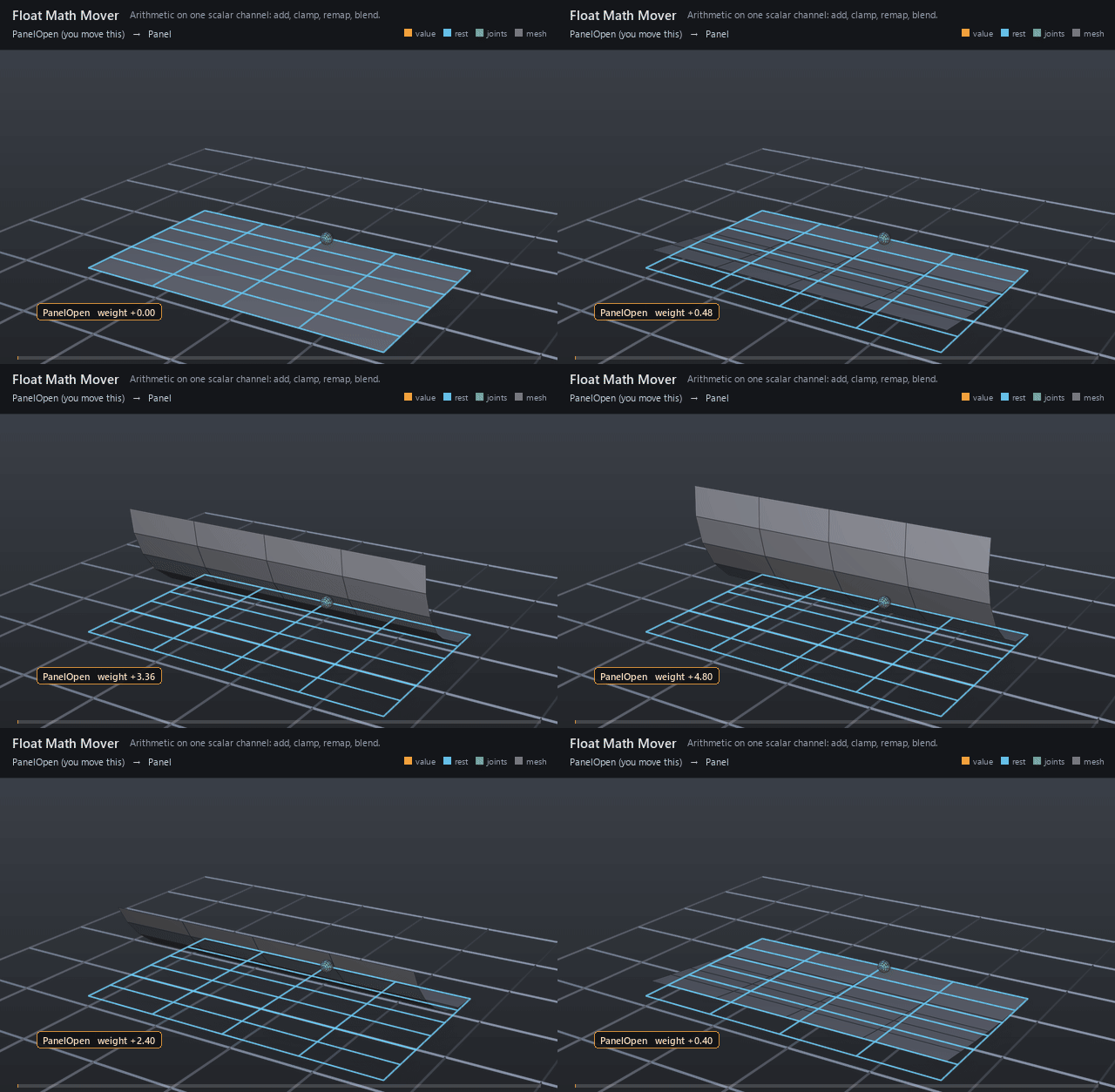
A hinged panel curls open from a single blendshape. The incoming
channel ramps straight up and back down, 0 → 4.8 → 0 in its own units, on
the blend input's inputs:weight. Two movers sit on that one property:
Normalize (remap, min 0 max 4) turns the raw number into a weight, and
Bound (clamp, min 0 max 1) catches the overshoot. At the peak the chain
reads 4.80 raw → 1.20 remapped → 1.00 bounded, and 1.00 is all the
blendshape ever sees.
Watch for the stall. There is no hold anywhere in the animation, yet the
panel stops dead for about half a second near the top: the chip climbs
past 4.00 to 4.80 and back down to 4.00 while the geometry does not move a
pixel. That stall is Bound — everything above raw 4.0 remaps past 1.0
and is clamped back to it. The chip shows the raw number going in; the
panel shows what came out. The wire sphere at the origin is the Hinge
joint, a landmark on the line the panel curls about: nothing targets it
and it drives nothing, the blendshape does all the work.
Open it live with:
Re-render the GIF above with:
Tips
- Property chains run before the operations that read their target, so a revised weight reaches solvers and movers in the same evaluation.
- Same-target math movers run in mover-stack order — the reversed namespace walk — so the LAST sibling listed executes FIRST.
reorder nameChildrenis how the example puts remap before clamp. remaponly normalizes:(v − min) / (max − min), with a zero-width range returning 0 rather than dividing. Chain aclampafter it whenever the incoming channel can overshoot.- A connection to a property these movers revise reads its base, the authored value before any of them. Declare
rigExecReadPhase = "final"on the connected input to read their result, or a prim path to read it as that prim's movers left it. The phase is read on every connected attribute under the rig root, whatever operator it belongs to; see Connected inputs and example 16. - A float input connected to a pose interpolator's output (a pose weight or an animated map's
outputs:value) reads the output's authored value when undeclared. DeclarerigExecReadPhase = "final"to read what the interpolator computed in the same evaluation; the mover then runs after it, and two interpolators that drive each other's inputs this way form a cycle, which every evaluator sets aside. - Dragging the revised property itself edits its base: the movers revise the dragged value as they would the authored one, so a channel clamped to [0, 1] and dragged to 1.4 shows 1.0, during the drag and after it is released.
pathreads its curve'spointsas an input: a baked program lists them as apoint3f[]input of fixed count, so a host can move the path every frame.inputs:valueis the distance the first point stands at; a window of points that slides along a walk advances it to keep one distance clock.rigExec:pathMeasure = "planar"measures ground distance, so heights in the points' y do not stretch a walk's strides.