 Control
The animator's handle: animation is authored on its avars.
| Node type | RigExecControl |
| Example | control.usda |
On this page:
Overview
A control is the rig's interaction surface. An animator keys its
translation, rotation, scale, and spin avars, and solvers and movers read
the resulting posed frame. Controls draw a viewport guide at the posed
origin — sphere, circle, box, cube, diamond or pyramid, drawn
as curves (wire) or as solids (geometry), or custom wire polylines
from guide:points — so the handle can be picked
directly; unlike joints and solvers, a control is not a diagnostic, so it
keeps the default render purpose.
An animator-facing RigExecXformable: animation is authored
on the avars (or an authored/connected posed:space). Channel
semantics live on the applied
RigExecControlAPI. Publishes computePointFrame/computeRestFrame/
computeMatrix. A synthesized viewport guide can be drawn at the posed
frame origin (see guide:shape) in the same synthesis-only style as the
RigExecJoint guides; it carries the control's resolved purpose, which
stays default unless authored.
How it works
A control is an input: no solver writes it, and its base frame
comes from rest:space plus the avars each frame: translations and Euler
rotations compose over the rest offset inside the selected parent and
default spaces (avars * posed:defaultSpace *
inverse(parent:defaultSpace) * parent:space), and scale avars apply
before rotation and translation. A pose constraint that names the control
on rigExec:moves, such as a harmonics jiggle, revises it in the pose
phase, and a consumer that reads final sees the revision. Anything
downstream — an FK chain listing the control, a constraint naming it as a
source, a matrix mover reading its frame — follows the animated result
with no further wiring.
Wiring
| Relationship | Points to | Required |
|---|---|---|
| (none) | Controls are read by solvers, constraints, and movers; they take no input relationships. | - |
Parameters
Control channel
rigExec:channelRole
Type: uniform token. Default: "pose".
Valid values: pose, switch, tweak.
Transform provider
rest:tx
Type: double. Default: 0.
rest:ty
Type: double. Default: 0.
rest:tz
Type: double. Default: 0.
rest:rx
Type: double. Default: 0.
rest:ry
Type: double. Default: 0.
rest:rz
Type: double. Default: 0.
rest:space
Type: matrix4d. Default: ( (1, 0, 0, 0), (0, 1, 0, 0), (0, 0, 1, 0), (0, 0, 0, 1) ).
Bind transform relative to the namespace frame provider's rest frame, applied after the rest:tx/ty/tz/rx/ry/rz offsets; always orthonormalized. A plain Xformable between the provider and that frame provider is composed in after it. A provider with no RigExec ancestor and no such Xformable resolves against identity, so its rest:space is its local-to-world bind transform.
default:tx
Type: double. Default: 0.
default:ty
Type: double. Default: 0.
default:tz
Type: double. Default: 0.
default:rx
Type: double. Default: 0.
default:ry
Type: double. Default: 0.
default:rz
Type: double. Default: 0.
default:space
Type: matrix4d. Default: ( (1, 0, 0, 0), (0, 1, 0, 0), (0, 0, 1, 0), (0, 0, 0, 1) ).
Local-to-world zero position for posing. Its computed fallback is compose(default translation/XYZ rotation) * rest * inverse(parent rest) * parent:defaultSpace. The rest is unaffected by default edits. A connection is authoritative, including identity. Otherwise a non-identity authored matrix overrides the computed fallback; an identity value selects that fallback.
posed:space
Type: matrix4d. Default: ( (1, 0, 0, 0), (0, 1, 0, 0), (0, 0, 1, 0), (0, 0, 0, 1) ).
Final local-to-world transform. For a joint a solver writes, this is supplied by the compiler's solver binding; it may also be authored or connected directly. Unwired xformables follow the parent chain with rest offsets and avars.
posed:defaultSpace
Type: matrix4d. Default: ( (1, 0, 0, 0), (0, 1, 0, 0), (0, 0, 1, 0), (0, 0, 0, 1) ).
Controller-adjusted zero pose; falls back to avars:defaultSpace. Used by the local-avars pose path before parent motion. A connection overrides the fallback, as does a non-identity authored matrix.
avars:tx
Type: double. Default: 0.
avars:ty
Type: double. Default: 0.
avars:tz
Type: double. Default: 0.
avars:rx
Type: double. Default: 0.
avars:ry
Type: double. Default: 0.
avars:rz
Type: double. Default: 0.
avars:rspin
Type: double. Default: 0.
avars:rotationOrder
Type: token. Default: "XYZ".
Valid values: XYZ, XZY, YXZ, YZX, ZXY, ZYX.
avars:defaultSpace
Type: matrix4d. Default: ( (1, 0, 0, 0), (0, 1, 0, 0), (0, 0, 1, 0), (0, 0, 0, 1) ).
Zero pose supplied to avar evaluation; falls back to the computed default:space. A connection or non-identity authored matrix selects another zero pose.
avars:unitScaleFactor
Type: double. Default: 1.
Multiplier converting translation avars into local distance units before the selected default and parent transforms. Rotations and scales are unaffected.
avars:rotationSign
Type: double3. Default: (1, 1, 1).
Per-axis sign applied to rx, ry and rz -- and to rspin, which is an X rotation -- before they are composed. Each component carries a sign and nothing else: a magnitude is discarded, and anything that is not negative, including zero, selects +1. Zero would otherwise erase an axis, so it resolves to the unmirrored answer rather than a collapsed one.
This is how a MIRRORED limb is declared: the same rotation value moves both sides symmetrically. A mirror expressed as a negative scale cannot survive into a rest frame here -- it would make the frame left-handed and every joint, driver and bind below it would have to be rebuilt to match -- so the mirror is declared on the avars instead, where it belongs: it says which of this control's axes already point the mirrored way and which answer backwards.
Identity at rest, and that is the point. A sign changes nothing when the avars are zero, so declaring it cannot move the rest pose, the skin, or anything constrained to this control. Only what the animator types changes meaning.
Applied to the avar, not to the frame, so the control's own posed frame mirrors too and a manipulator turns with the limb rather than against it.
parent:space
Type: matrix4d. Default: ( (1, 0, 0, 0), (0, 1, 0, 0), (0, 0, 1, 0), (0, 0, 0, 1) ).
Selected parent's posed local-to-world space. Falls back to the nearest namespace provider's computePointFrame; identity when there is none. Connections (including identity) or a non-identity authored matrix select a different parent space.
parent:defaultSpace
Type: matrix4d. Default: ( (1, 0, 0, 0), (0, 1, 0, 0), (0, 0, 1, 0), (0, 0, 0, 1) ).
Selected parent's default local-to-world space. Falls back to the nearest namespace provider's computeDefaultFrame. Connections (including identity) or a non-identity authored matrix override it. The avar pose is avars * posed:defaultSpace * inverse(parent:defaultSpace) * parent:space, in row-vector convention.
Node parameters
rigExec:channelSpaces
Relationship.
Optional ordered pair of control providers publishing the rotation and translation channel bases in asset space. This is an explicit editing contract for a connected posed:space computation that consumes this control's unconnected TRS avars: rotation is S * R * rotationSpace, and position is translationSpace.Transform(T). A channel-independent scale multiplier before R is allowed. Hosts must read all three frames from the same evaluated publication and refuse editing if the providers are missing or singular. The pair does not replace evaluation or authorize editing an arbitrary solver output. Pivot edits are unavailable for this contract.
rigExec:translationEnabled
Type: uniform bool. Default: true.
Whether a channelSpaces control accepts translation edits. Rotation and scale remain editable when false.
guide:source
Relationship.
Optional single rig control or joint whose evaluated frame places the guide. Picking still selects the owning control.
avars:sx
Type: double. Default: 1.
Local X scale applied before rotation and translation; finite magnitudes below 1e-4 resolve to signed 1e-4, strict authoring rejects non-finite values, and raw non-finite USD resolves to identity on this axis.
avars:sy
Type: double. Default: 1.
Local Y scale applied before rotation and translation; finite magnitudes below 1e-4 resolve to signed 1e-4, strict authoring rejects non-finite values, and raw non-finite USD resolves to identity on this axis.
avars:sz
Type: double. Default: 1.
Local Z scale applied before rotation and translation; finite magnitudes below 1e-4 resolve to signed 1e-4, strict authoring rejects non-finite values, and raw non-finite USD resolves to identity on this axis.
guide:shape
Type: uniform token. Default: "circle".
Valid values: sphere, circle, box, cube, diamond, pyramid, custom.
Guide primitive synthesized at the control's posed frame origin (docs/specs/control-guides.md), exactly parallel to the RigExecJoint sphere/cone guides. The built-in shapes are unit-sized and centered at the origin: sphere and circle have radius 1, box and cube span +-1, diamond (octahedron) has vertices at +-1 on each axis, and pyramid has base corners (+-1, -1, +-1) with apex (0, 1, 0). circle and box are the planar shapes -- normal +Y, drawn in the local XZ plane -- while cube is the 3D box; this is the conventional rigging distinction between the two box-ish tokens. custom uses arbitrary local polylines from guide:points and guide:curveVertexCounts, preserving the evaluated affine frame.
guide:points
Type: point3f[]. Default: [].
Local vertices of a custom wire guide, placed by the evaluated control frame.
guide:curveVertexCounts
Type: int[]. Default: [].
Consecutive polyline sizes for guide:shape=custom. Each is at least two and their sum must equal guide:points size; otherwise no guide is drawn.
guide:planeNormal
Type: uniform token. Default: "Y".
Valid values: X, Y, Z.
Which LOCAL axis the planar guides' normal points along, for circle and box. Ignored by the volumetric shapes.
A rig's control curves lie in whichever plane the rigger drew them in. A planar guide drawn in a different plane from its curve shows edge-on, as a sliver of the right size.
Y is the default.
guide:drawMode
Type: uniform token. Default: "wire".
Valid values: wire, geometry.
wire draws the guide as curves, widthed by guide:wireWidth. geometry draws solid shapes instead; custom draws only as wire, so custom with geometry draws no guide.
guide:wireWidth
Type: double. Default: 0.05.
Width of the drawn wire guide curves, in the LOCAL pre-scale units of the unit shape -- so the drawn width tracks the evaluated control-frame scale multiplied by guide:scaleX/Y/Z along with the rest of the shape. A non-uniform effective scale thickens the curve anisotropically exactly as it stretches the points.
Zero, negative, or non-finite publishes no widths and falls back to hairline rendering; geometry draw mode ignores this entirely.
It has a default rather than being left unauthored because usdview picks with a single-pixel window: an unwidthed hairline is a one-pixel target that a real click virtually never lands on, and an empty pick deselects to the pseudo-root. The default width is what makes a wire control selectable at all.
guide:scaleX
Type: double. Default: 1.0.
Positive per-axis draw multiplier of the guide shape whose final size is abs(evaluated frame axis) * guide:scaleAxis, authored as three separate double properties rather than a vec3. The control's posed frame is orthonormalized for placement while its evaluated axis magnitudes are retained for sizing. A non-positive or non-finite guide multiplier on any axis draws no guide at all, independently of the signed 1e-4 floor on avars:sx/sy/sz.
guide:scaleY
Type: double. Default: 1.0.
Per-axis draw scale along the local Y axis; see guide:scaleX.
guide:scaleZ
Type: double. Default: 1.0.
Per-axis draw scale along the local Z axis; see guide:scaleX.
guide:offset
Type: double3. Default: (0, 0, 0).
Where the guide shape is drawn, in the control's LOCAL frame, relative to the control's origin. The control still pivots, rotates and scales about its origin; only the drawn shape moves. It is what lets a control whose pivot is buried inside a character (the upper face turns about the base of the skull) be drawn somewhere it can be seen and picked. Scaled by the evaluated control-frame scale, so a scaled control carries its shape with it.
guide:orient
Type: quatf. Default: (1, 0, 0, 0).
Rotation of the drawn shape in the control's LOCAL frame, applied after guide:scaleX/Y/Z and guide:planeNormal and before guide:offset. Lets a shape keep its placement when the control's own axes are re-oriented: the shape stays where it was drawn while the axes the animator rotates about change. Identity by default.
guide:displayColor
Type: color3f. Default: (1.0, 0.85, 0.2).
Constant colour of the synthesized guide. May be CONNECTED
to another color3f attribute, in which case the first connection
source's value at the evaluated time is drawn instead of the local
one -- the imaging bridge follows the connection because
UsdAttribute::Get never does. A source that math movers revise is
read at this attribute's rigExecReadPhase: its authored base unless
final or a checkpoint is declared.
guide:displayOpacity
Type: float. Default: 1.0.
Constant opacity of the synthesized guide. May be CONNECTED
to a float or double attribute -- a limb's IK/FK dial, say -- and
then the first connection source's value at the evaluated time is
what is drawn, optionally complemented by guide:displayOpacityInvert
and never below guide:displayOpacityMin. A dial that math movers
revise is read at this attribute's rigExecReadPhase: its authored
base unless final or a checkpoint is declared. An unconnected
attribute draws exactly the value it holds, floor and invert
ignored.
guide:displayOpacityInvert
Type: uniform bool. Default: false.
When guide:displayOpacity is connected, draw 1 - source instead of source. This is what lets one dial fade two control sets in opposite directions: the IK controls connect to the switch as-is, the FK controls connect to the SAME switch with this set, and there is no second source of truth to drift. Ignored when the opacity is not connected.
guide:displayOpacityMin
Type: uniform float. Default: 0.15.
Floor applied to a CONNECTED guide:displayOpacity after the optional inversion. A dial parked at its end stop would otherwise drive the inactive control set to exactly zero, and a fully transparent control is a trap: an animator who switches a limb to IK can no longer see the FK controls they need to switch back. Hydra still picks at any opacity above 0.0001, so the floor is for the eye, not the picker: 0.15 is enough to find a ghosted control against the character. Zero restores a true fade-out. Ignored when the opacity is not connected.
Example
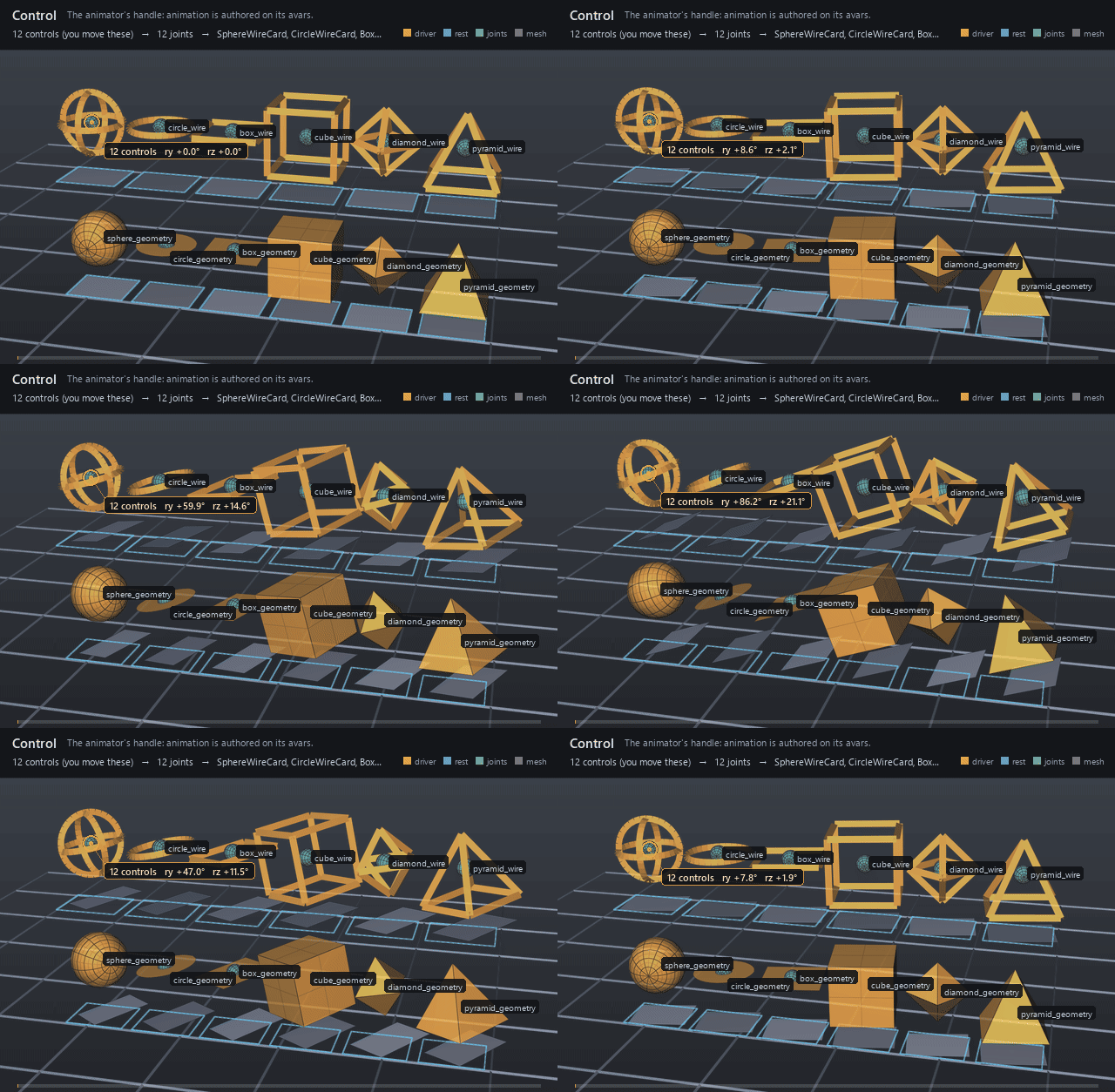
Twelve controls in a 6x2 grid draw every built-in guide:shape in
every guide:drawMode. Left to right in both rows: sphere, circle, box, cube,
diamond, pyramid — box is the planar square lying flat in XZ, cube the
solid six-sided one. The top row is wire (the guide is drawn as curves),
the bottom row geometry (the same shape drawn as a solid). All twelve
carry the same animation — avars:ry 0 → 90°, avars:rz 0 → 22° and
avars:ty 0 → 0.25 by 1012, back to 0 by 1024 — and all twelve do real work: each
feeds an FK chain that poses a joint resting at the control, and a matrix
mover carries the grey card a unit below it. Watch either row against the
blue rest outline the cards leave behind: ry spins the card about the
handle's own origin, rz tips it out of the ground plane, and ty lifts
it clear of the outline. The rotation is what the round shapes could not
show on their own — a sphere or a circle turned about its symmetry axis
looks identical — so the card is where the frame's motion becomes
visible.
Open it live with:
Re-render the GIF above with:
Tips
- Keep
rest:spaceat the handle's bind pose and animate only the avars; rest edits re-proportion every downstream solve. guide:shapeandguide:drawModechange the pickable viewport guide without touching evaluation; a pair the build does not draw synthesizes no guide at all rather than falling back to one.guide:wireWidthis in the unit shape's local units — the drawn width is scaled byguide:scaleX/Y/Zalong with the shape — andgeometrydraw mode ignores it entirely.