 Vec3f Math Mover
Component-wise arithmetic on one vector-valued property.
| Node type | RigExecVec3fMathMover |
| Example | vec3f_math_mover.usda |
On this page:
Overview
Float math lifted to three components: add, multiply, clamp, remap,
or blend over an exact vector-valued attribute. The target does not have
to be typed float3 — every GfVec3f-backed scalar role is accepted
(float3, vector3f, point3f, normal3f, color3f), because a mover
offsetting a vector and one offsetting a colour are doing the identical
arithmetic. Native transform ops are the natural targets: revising an
Xform's xformOp:scale carries its whole subtree without touching a
point. Watch the precision — UsdGeom authors a scale op as float3 but
a translate op as double3 by default, and a double3 target is a
compile error, so a translate this mover drives has to be authored at
float precision.
Statically typed add, multiply, clamp, remap, or blend over an exact float3, vector3f, point3f, normal3f or color3f property target.
Every operation is component-wise, which is why the bounds are float3 rather than float. Remap and common MoverAPI-envelope semantics match RigExecFloatMathMover.
How it works
Each evaluation reads the mover's authored inputs, computes
r = op(incoming) per component, and mixes the result back over the
incoming value through the common envelope,
incoming + defaultWeight × (r − incoming), one component at a time — so
a zero envelope is an exact pass-through and one applies the operation
outright. add and multiply use inputs:value, blend replaces the
incoming value with it, and clamp/remap use the inputs:min and
inputs:max bounds, which are float3 precisely so the three components
can be bounded differently. remap normalizes [min, max] to [0, 1]
without clamping (a degenerate min == max yields 0).
Inputs may be CONNECTED rather than authored locally: the read follows
the connection chain and resolves the source at the evaluated time, which
is what lets an animator channel published on a control drive the mover.
The chain runs before every operation that reads the revised attribute,
and they read its result as the attribute's value; a chain whose input is
produced by another property chain is ordered after its producer. That
input reads the producer's base, its authored value, unless it declares rigExecReadPhase = "final" or a checkpoint (see
Connected inputs).
Wiring
| Relationship | Points to | Required |
|---|---|---|
rigExec:moves |
Exactly one exact vector-valued property to revise (float3, vector3f, point3f, normal3f, color3f). |
yes |
inputs:value.connect |
Optional connection supplying the operand from another float3 attribute — a control's animated channel, say — instead of an authored constant. |
no |
rigExec:weightObject |
Optional one-element weight field supplying the envelope instead of inputs:defaultWeight. |
no |
Parameters
Common mover envelope
rigExec:moves
Relationship.
Reserved write-set relationship: exact prim/property targets.
inputs:enabled
Type: bool. Default: true.
Shape-preserving enable. Disabled movers pass their preceding revision through unchanged (value-only edit).
inputs:defaultWeight
Type: float. Default: 1.
Normalized common mover envelope in [0, 1]. With no bound rigExec:weightObject it broadcasts over every logical element: zero passes the incoming value through bit-for-bit and one applies the mover's full-strength result. A non-finite value or one outside [0, 1] passes the incoming value through with a diagnostic.
rigExec:weightObject
Relationship.
Optional compatible total weight field, at most one target. When bound, the weight object's values (including its own sparse or constant fallback) supply the common envelope instead of inputs:defaultWeight. Target, domain, and cardinality must match each mover application; an incompatible binding is a compile error. A multi-target mover may bind only a constant operation envelope whose weightTarget is the mover prim itself; that one value broadcasts to every application of the atomic mover.
Node parameters
rigExec:operation
Type: uniform token. Default: "add".
Valid values: add, multiply, clamp, remap, blend.
inputs:value
Type: float3. Default: (0, 0, 0).
inputs:min
Type: float3. Default: (0, 0, 0).
inputs:max
Type: float3. Default: (1, 1, 1).
Example
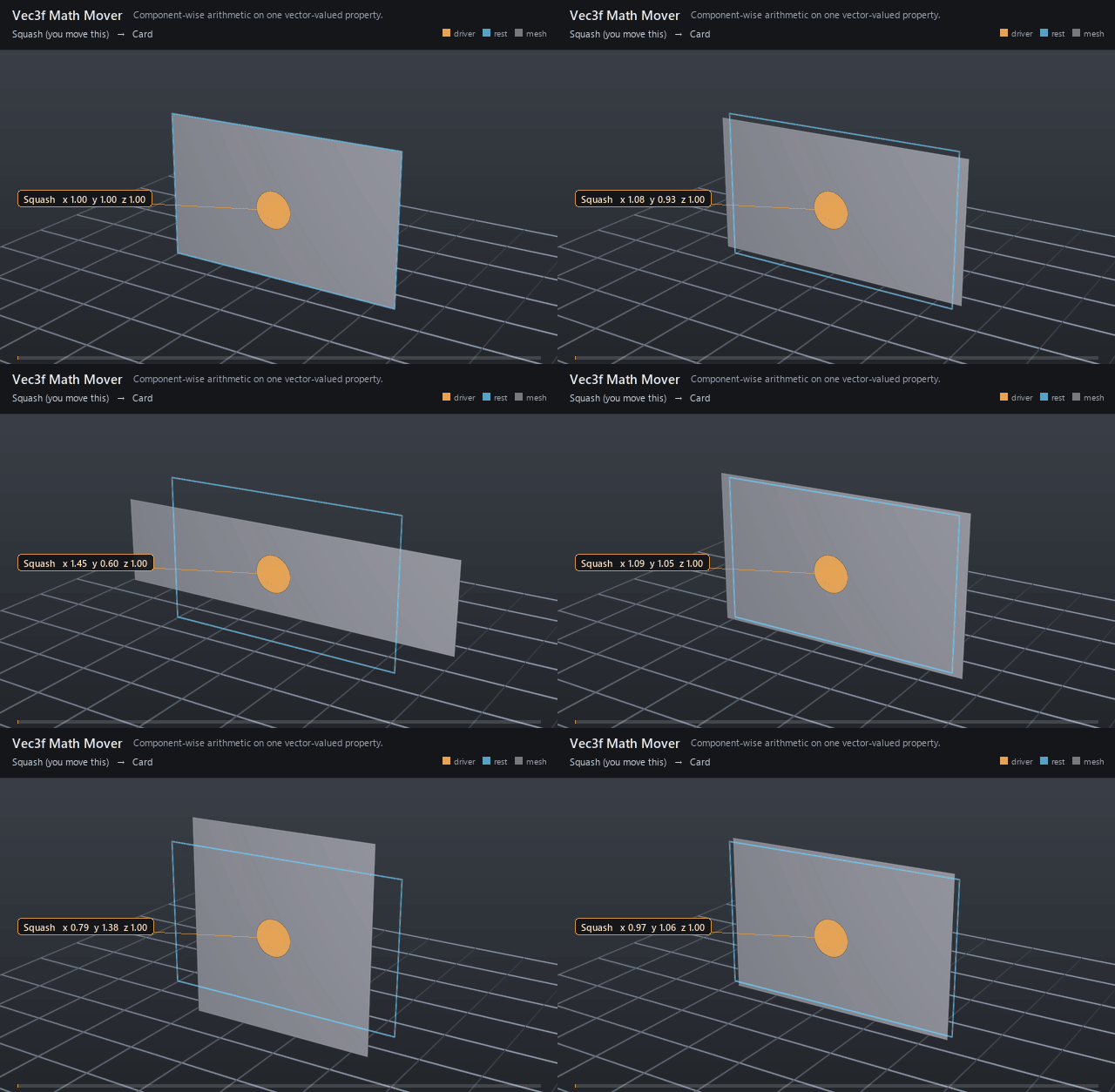
A Squash control sits on the card as a solid disc guide in the
card's own plane, and publishes one animator channel — a float3
inputs:squash keyed (1, 1, 1) → (1.45, 0.6, 1) → (0.72, 1.5, 1) → back.
The mover's inputs:value is connected to that channel and multiplies it
onto the card Xform's xformOp:scale, so the card squashes wide and
stretches tall around the handle while its authored scale stays
(1, 1, 1) and no point is ever touched.
Open it live with:
Re-render the GIF above with:
Tips
- Connect
inputs:valueto a channel on a control to make the handle, not the mover, the thing an animator keys — the read follows the connection at the evaluated time. - A vector channel carries time SAMPLES, not a spline: USD splines are scalar-valued, so
.splineis for the avars and afloat3channel is keyed with.timeSamples. - Clamp and remap bounds are per component, so one mover can bound an asymmetric 3D range — and
remapdoes not clamp, so compose a clamp mover after it when you want the result bounded. multiplyat full envelope hands the operand through outright when the incoming value is (1, 1, 1); switch the operation toaddand the same channel becomes an offset on a float-precision translate op (the defaultxformOp:translateisdouble3, which the mover rejects).