 Matrix Math Mover
Multiplies or blends one matrix channel.
| Node type | RigExecMatrixMathMover |
| Example | matrix_math_mover.usda |
On this page:
Overview
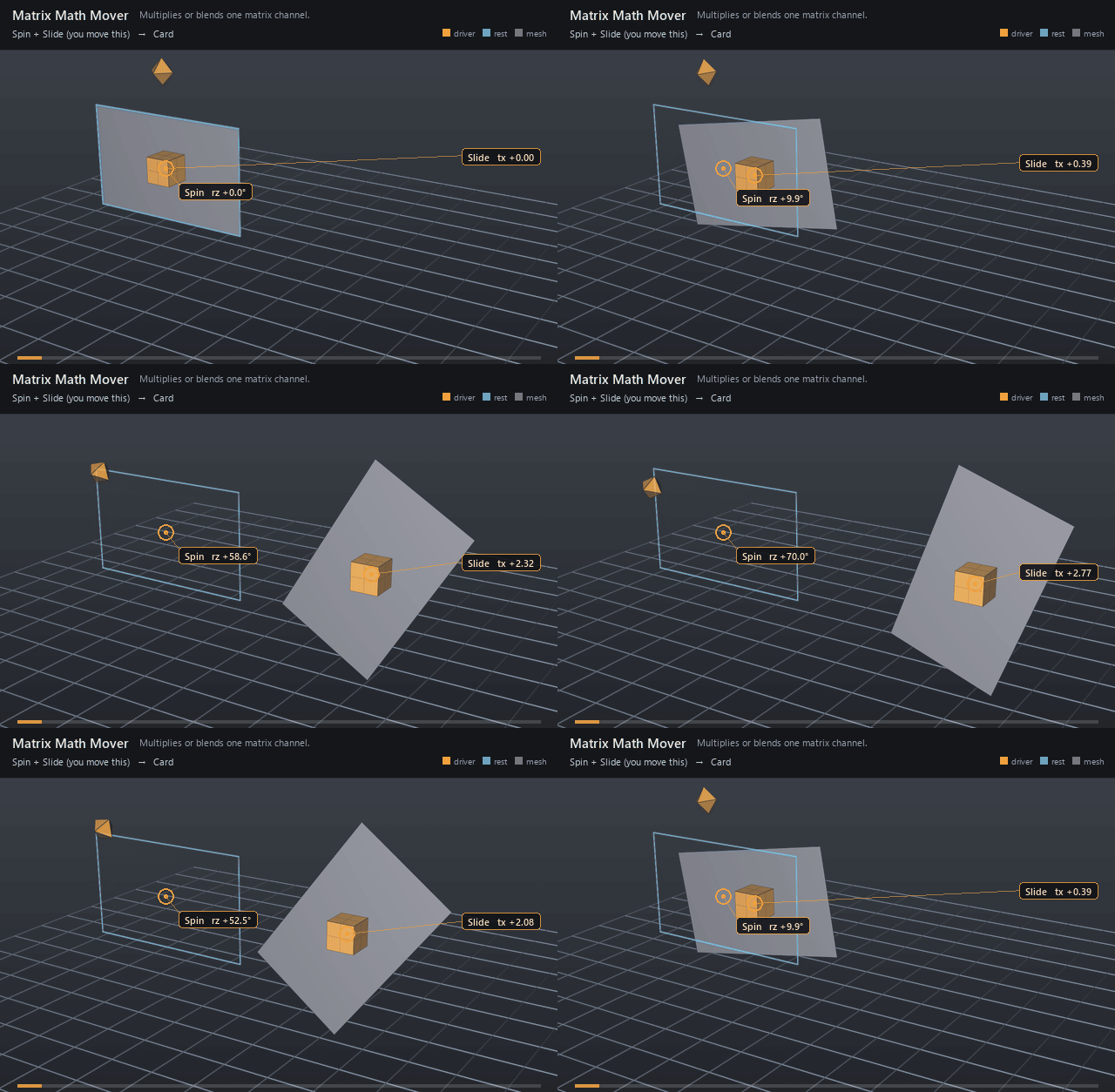
Matrix arithmetic on an exact matrix4d attribute — composing spaces,
post-multiplying offsets, blending between alternative frames. Distinct
from the point-moving Matrix Mover: this one revises the matrix itself,
and whatever reads that matrix follows. The operand is an ordinary
matrix4d input, so it can be a constant or a connection to another matrix
channel — a control's posed:space makes an animator handle the second
matrix in the product.
Statically typed multiply or blend over an exact matrix4d property target. Distinct from the point-moving RigExecMatrixMover.
multiply post-multiplies (inputs:value applied AFTER the incoming matrix, in GfMatrix4d's row-vector convention); blend replaces. The common MoverAPI envelope mixes component-wise and is exact at both endpoints.
How it works
multiply post-applies inputs:value after the incoming matrix
(row-vector convention: points meet the incoming matrix first, the value
second); blend replaces it. The envelope mixes component-wise and is
exact at both endpoints, so a blend at weight 1 is a straight
substitution and a partial weight is a crossfade between two frames.
inputs:value may be CONNECTED, which is how a control drives the
arithmetic: the mover reads the same posed:space matrix the control is
posed and drawn at. Connected to a joint's or control's posed:space, it
reads that provider's evaluated frame: after its solvers by default, or
after its constraints when the input declares rigExecReadPhase = "final".
Wiring
| Relationship | Points to | Required |
|---|---|---|
rigExec:moves |
Exact matrix4d property to revise. | yes |
inputs:value.connect |
Optional matrix4d source for the operand. Pointed at a control's posed:space, the mover follows that handle; unconnected, it uses the authored constant. |
no |
Parameters
Common mover envelope
rigExec:moves
Relationship.
Reserved write-set relationship: exact prim/property targets.
inputs:enabled
Type: bool. Default: true.
Shape-preserving enable. Disabled movers pass their preceding revision through unchanged (value-only edit).
inputs:defaultWeight
Type: float. Default: 1.
Normalized common mover envelope in [0, 1]. With no bound rigExec:weightObject it broadcasts over every logical element: zero passes the incoming value through bit-for-bit and one applies the mover's full-strength result. A non-finite value or one outside [0, 1] passes the incoming value through with a diagnostic.
rigExec:weightObject
Relationship.
Optional compatible total weight field, at most one target. When bound, the weight object's values (including its own sparse or constant fallback) supply the common envelope instead of inputs:defaultWeight. Target, domain, and cardinality must match each mover application; an incompatible binding is a compile error. A multi-target mover may bind only a constant operation envelope whose weightTarget is the mover prim itself; that one value broadcasts to every application of the atomic mover.
Node parameters
rigExec:operation
Type: uniform token. Default: "multiply".
Valid values: multiply, blend.
inputs:value
Type: matrix4d. Default: ( (1, 0, 0, 0), (0, 1, 0, 0), (0, 0, 1, 0), (0, 0, 0, 1) ).
Example
Two handles and one card, with no solver in between, and each
handle is drawn as one of the two operands. The diamond swinging on a
stalk above the card's rest centre is the Spin dial: it is the blend
operand, and the blend mover takes the card Xform's authored identity
straight to that frame (envelope 1 is a substitution, not a mix). The
box riding the card's centre is the Slide handle, the multiply
operand, post-applied afterwards. Because the multiply comes after, its
translation acts in the spun frame's parent: the card turns about its own
centre through 70° and then slides along the grid's X, not along its
own tilted X — which is the whole difference between post- and
pre-multiplication, visible in one picture. The blue wireframe card is
the rest pose the pair departs from.
Open it live with:
Re-render the GIF above with:
Tips
- Post-multiplication order matters: the value applies AFTER the incoming matrix, so it acts in the incoming frame's parent — a translation runs along the parent axes whatever rotation came before it, and the incoming transform happens first.
- Connect
inputs:valueto a control'sposed:spaceto make the operand animatable. A joint'sposed:spaceworks the same way: the connection reads its solved frame, andrigExecReadPhase = "final"on the input reads it after its constraints. - Two movers on one matrix are a stack, and composed children execute bottom-up — author the
blendthat establishes the frame BELOW themultiplythat offsets it.