 Dynamic Weight
The joint is frozen; only the painted field is animated.
| Node type | RigExecDynamicWeight |
| Example | dynamic_weight.usda |
On this page:
Overview
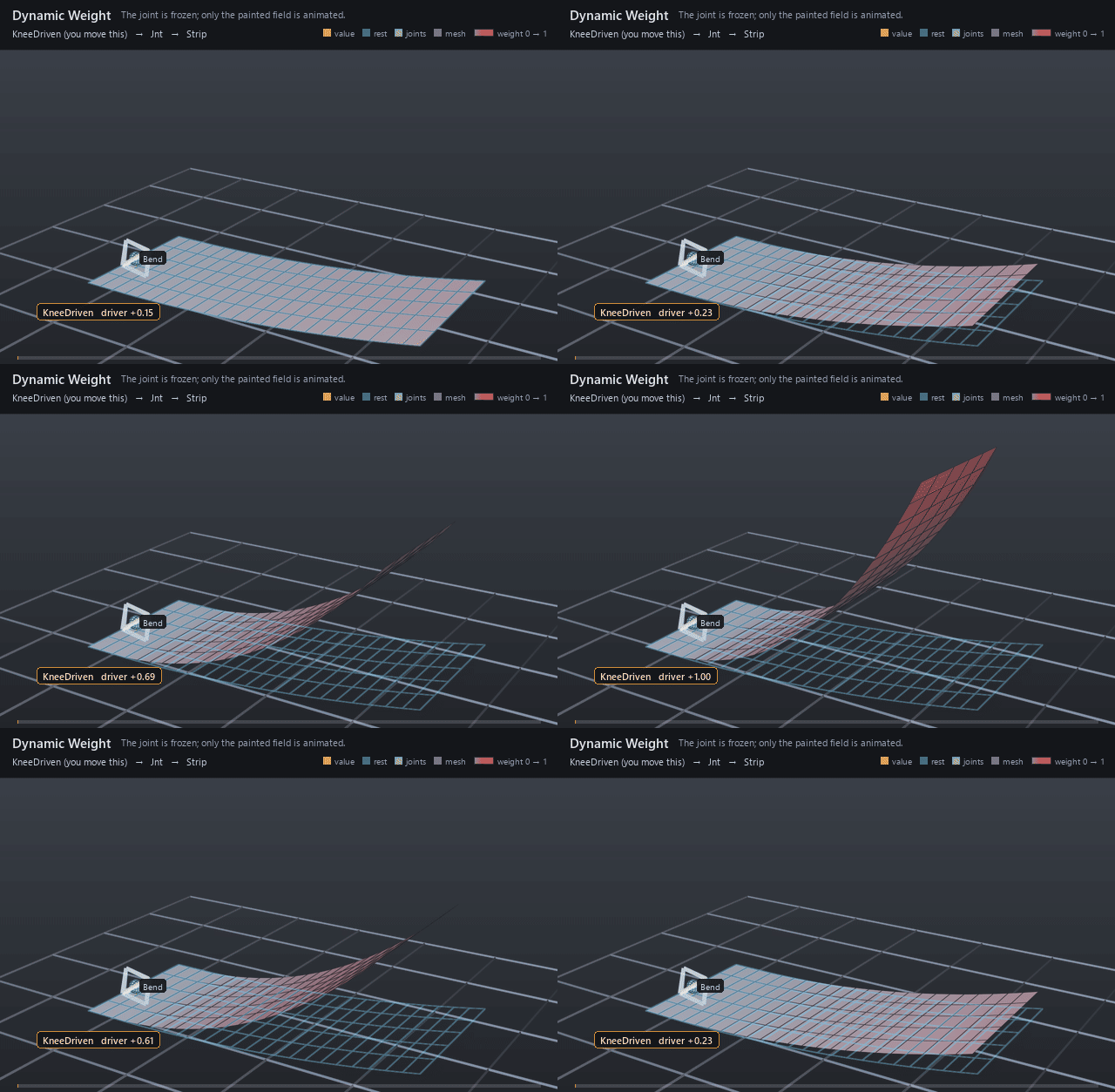
Paint that moves: a dynamic weight takes a static base field and
reshapes it every frame from an animated driver — a muscle that engages
with effort, a corrective that fades with a pose, a knee influence that
breathes with the stride. Same target contract as the field it wraps: it
declares the same rigExec:weightTarget and is bound in the mover's
place of the field it modulates.
Fixed-shape weight field recomputed from statically declared inputs, optionally modulating a base weight object: r_i = (b_i * d) * s + a; w_i = RangePolicy(r_i). Without rigExec:baseWeight, b_i = 1 and the field must be constant.
How it works
The compiler binds the mover's rigExec:weightObject to one
computeWeightPacket for the whole compiled rig, and every generation
re-evaluates that packet from inputs:driver, inputs:scale, and
inputs:bias as ordinary dynamic inputs before the mover walk reads it
at the consuming revision. The base field resolves first — the
rigExec:baseWeight relationship pulls that object's own packet —
then each element becomes (b × inputs:driver) × inputs:scale +
inputs:bias — inputs:scale and inputs:bias apply after the driver
is combined in, not to the driver — and rigExec:rangePolicy either
rejects a result outside [0, 1] (strict) or clamps it (clamp). The
resolved envelope is handed to the mover and, when the influence overlay
is armed, published as the field a rigger is shown; nothing is written
back to the stage.
Wiring
| Relationship | Points to | Required |
|---|---|---|
rigExec:baseWeight |
Weight field this one modulates; required unless the representation is constant, and at most one target. |
yes |
rigExec:weightTarget |
Exact points property this field covers; must match the target of the mover that binds it. | yes |
| (bound by) | A mover's rigExec:weightObject applies this field. |
- |
Parameters
Weight field
guide:weightDisplay
Type: uniform token. Default: "tint".
Valid values: tint, heatmap, bands.
Selected influence overlay: tint blends gray to red; heatmap interpolates dark blue, blue, teal, yellow and red at weights 0, .25, .5, .75 and 1. bands assigns five colors in .2-wide bins. Colors use resolved vertex weights, clamped to [0,1] for display; faces interpolate them, so bands are approximate on coarse meshes. Does not change weights, materials or opacity on the source stage.
rigExec:weightTarget
Relationship.
Canonical prim or exact property carrying the weighted domain. For a constant envelope over an atomic multi-target mover, this is the mover prim itself.
rigExec:representation
Type: uniform token. Default: "constant".
Valid values: constant, dense, sparse.
rigExec:rangePolicy
Type: uniform token. Default: "strict".
Valid values: strict, clamp.
Node parameters
rigExec:baseWeight
Relationship.
rigExec:operation
Type: uniform token. Default: "multiply".
Valid values: multiply.
inputs:driver
Type: float. Default: 1.
inputs:scale
Type: float. Default: 1.
inputs:bias
Type: float. Default: 0.
Example
A 24 × 6 strip is skinned to one joint that holds a fixed 35-degree
bend, and the only animation in the file is inputs:driver sweeping
0.15 → 1 → 0.15. The base paint is a straight ramp from 0 at the
one-sixth mark to 1 at the tip, and with inputs:scale = 1 the driver
simply scales that whole field at once: every painted point follows the
same fraction of the bend at every moment, so the grey-to-red ramp
brightens and dims — and the strip curls further and relaxes — while the
control and the joint never move. The docs renderer tints the strip by
the field the mover actually consumed — grey at weight 0, red at
weight 1 — so the ramp and the curl that follows it are the same
event.
Open it live with:
Re-render the GIF above with:
Tips
rangePolicy: clampis what letsinputs:scaleoverdrive the paint: a result outside [0, 1] is clamped instead of invalidating the field and passing the mover's points through, so a driver can push part of a painted ramp to fully followed while the rest of it still fades.- The influence overlay paints the field a mover consumed, so point it at the dynamic weight, not the base it wraps: an unbound base has no resolved field of its own to show.
- Drive the driver from another channel (a float math mover or a connection) to tie corrective strength to posing; each of driver, scale, and bias takes at most one float connection. A connection to a channel that float math movers revise reads its authored base unless the input declares
rigExecReadPhase = "final".