 Cloth Mover
Cloth with painted anisotropic materials, attachments and contact, simulated over the frames before the current one.
| Node type | RigExecClothMover |
| Example | cloth_mover.usda |
On this page:
Overview
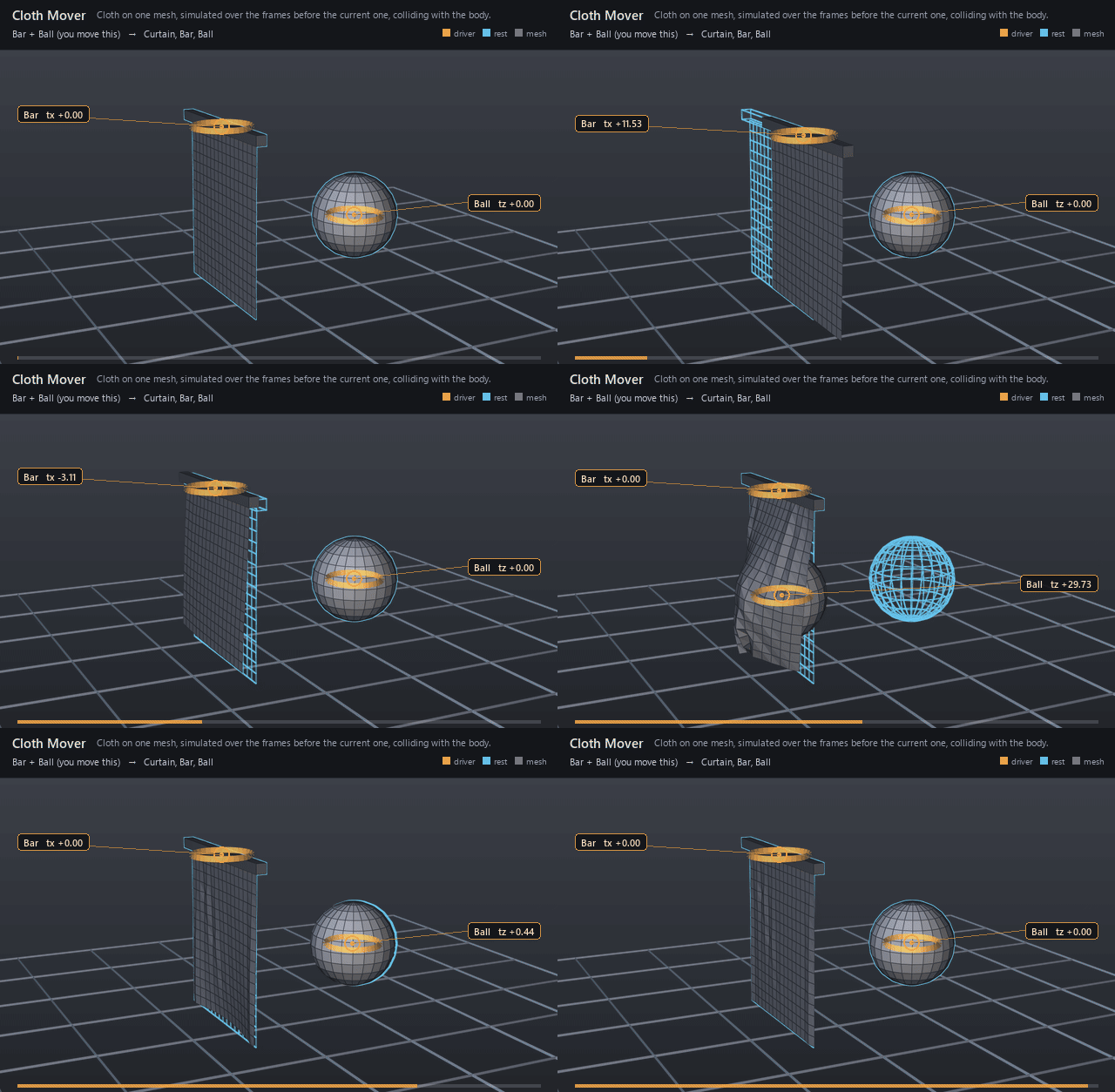
Makes one mesh behave as cloth: it hangs, swings and folds
under gravity, keeps its edge lengths, and slides over the meshes it collides
with. Pinned points follow the mesh's incoming points -- usually a skinned
garment -- and the rest are simulated. The result at a frame is a simulation
over a fixed window of the frames before it, so scrubbing, playback, a
background cache and a .rigexec reader agree. While a control is dragged,
the earlier frames stay the authored ones, so the pinned points follow the
drag and the rest of the cloth trails behind; the swing plays when time
moves. The live evaluator solves the window on the GPU when
the cloth is large enough, uses the legacy scalar material and nothing else
in the rig reads its points. Relationship-linked profiles use the shared CPU
solver in live, frozen and binary playback. Link rigExec:constraints to
RigExecClothConstraintSet prims for stretch, bend, damping, pins, tethers,
attachments, collision and self-contact. Each supports UV warp/weft response,
painted maps and a force-to-strength curve. See
cloth materials and bindings
for authoring and binding conventions. Attachment constraint sets draw guide
rods between their paired source and target samples on the displayed meshes,
including vertex, barycentric and UV bindings. Enable viewport guides to see
them; select a rod to select its constraint set. Style them with the constraint
set's guide:displayColor, guide:displayOpacity and guide:wireWidth.
See Secondary motion and cloth for the
window, the GPU path and their costs, and
algorithm references for the methods.
Cloth on one native mesh: the points rigExec:moves names hang, swing and fold under gravity, keep their edge lengths, and slide over the meshes rigExec:colliders names.
The result at a frame is a simulation over a window of the frames before it: the cloth starts at its incoming points rigExec:windowFrames frames earlier and is solved forward, frame by frame, to the current one, with pinned points following their incoming positions and the colliders moving as they did. Where a collider cuts through the incoming cloth within a window before or after that first frame, the window starts earlier, with a settling interval before contact (at most rigExec:maxWindowFrames). It depends only on the frames in the window, so scrubbing, playback and a background cache all agree, and while a control is dragged the earlier frames are the authored animation and the current frame is the dragged pose.
The solver is extended position-based dynamics with small steps, colored Gauss-Seidel stretch and bend projection, long-range tethers to the pins, and a contact test against the collider triangles at every step as the colliders move between frames (docs/references.md); see docs/concepts/secondary-motion.md. The cloth's points and the colliders' points are read in their own local spaces, which must be the same space. The common mover envelope blends the result once.
How it works
At each of the rigExec:windowFrames frames before the
current one, and at the current one, the mover captures its inputs: the
points entering it, every collider's points (at the relationship's
rigExecReadPhase; final collides with the posed body) and its parameters.
The earlier frames are generations of the same compiled graph at those times,
run only as far as the cloth's inputs reach, reading the authored stage. A
collider cutting through the incoming cloth can start the solve with points
inside it, or make successive frames replay different startup transients
into contact. When that happens within a window before or after the first
frame, the window starts earlier, at the latest frame that was clear of every
collider for a whole window on either side (up to the current frame), at most
rigExec:maxWindowFrames back. The settling interval before contact keeps
successive frames from replaying different startup transients into it.
The solve (clothKernel.h) then starts the cloth on its incoming points
at the window's first frame, moving with them, and steps it to the current
frame:
rigExec:substeps small steps per frame of extended position-based dynamics,
each predicting the points under gravity, projecting the stretch and bend
constraints colour by colour (no two constraints of a colour share a point),
limiting each free point to its pin's rest distance (tethers), pulling points
toward their incoming positions by their pin weight and inputs:attract, and
pushing points out of the collider triangles they are within reach of, with
friction. A point closes the collision gap along the closest violated
triangle's normal, and a triangle counts only when its closest point is within
max(thickness, collisionDepth). The common mover envelope blends the
result. On the GPU the same passes run as compute dispatches at the
publication boundary, one per pass over the whole cloth.
Wiring
| Relationship | Points to | Required |
|---|---|---|
rigExec:moves |
One native mesh's points property: the cloth. | yes |
rigExec:colliders |
Meshes the cloth collides with; rigExecReadPhase = "final" reads their posed points. |
no |
rigExec:pinWeights |
One weight per cloth point; 1 follows the incoming points exactly. | no |
rigExec:constraints |
Ordered RigExecClothConstraintSet prims; each links its bindings and paint maps. | no |
rigExec:restShape |
Rest Mesh or point3f[] property, in cloth vertex order and local space. | no |
rigExec:uvSet |
Float2 UV primvar used for material warp/weft directions; supports indexed vertex and face-varying values. | no |
Parameters
Common mover envelope
rigExec:moves
Relationship.
Reserved write-set relationship: exact prim/property targets.
inputs:enabled
Type: bool. Default: true.
Shape-preserving enable. Disabled movers pass their preceding revision through unchanged (value-only edit).
inputs:defaultWeight
Type: float. Default: 1.
Normalized common mover envelope in [0, 1]. With no bound rigExec:weightObject it broadcasts over every logical element: zero passes the incoming value through bit-for-bit and one applies the mover's full-strength result. A non-finite value or one outside [0, 1] passes the incoming value through with a diagnostic.
rigExec:weightObject
Relationship.
Optional compatible total weight field, at most one target. When bound, the weight object's values (including its own sparse or constant fallback) supply the common envelope instead of inputs:defaultWeight. Target, domain, and cardinality must match each mover application; an incompatible binding is a compile error. A multi-target mover may bind only a constant operation envelope whose weightTarget is the mover prim itself; that one value broadcasts to every application of the atomic mover.
Node parameters
rigExec:colliders
Relationship.
Meshes the cloth collides with, one-sided along their outward normals by default; collision profiles can enable two-sided response and paint its strength. Each collider's points are read at the relationship's rigExecReadPhase (base by default; final reads the points every mover on that mesh produces, such as a skinned body). Topology is fixed for a compile.
rigExec:constraints
Relationship.
Ordered RigExecClothConstraintSet prims for material, pins, attachments and collision. All solve inside this mover's shared operation.
rigExec:restShape
Relationship.
Optional mesh or exact point3f[] property defining rest distances and material frames. Same vertex order/count and coordinate space as the target. Absent uses target points at Default.
rigExec:uvSet
Relationship.
Exact float2[] or texCoord2f[] primvar defining warp/weft, with vertex, varying or faceVarying interpolation, indexed or not. Absent, a constraint profile with directional response (warp, weft and normal unequal, or painted) is a compile error.
rigExec:pinWeights
Type: uniform float[]. Default: [].
One weight per cloth point in [0,1]. A point at 1 (0.999 or above) follows its incoming position exactly; a lower weight is the fraction of the gap to its incoming position the point closes every frame. Empty pins nothing.
rigExec:windowFrames
Type: uniform int. Default: 16.
How many earlier frames the solve starts from, in [1,1024]. Motion older than the window is forgotten, so inputs:damping should let a swing settle within it; each frame of the window is solved again at every evaluation.
rigExec:maxWindowFrames
Type: uniform int. Default: 64.
The most earlier frames a solve reaches back to, in [1,1024]. When a collider cuts through the incoming cloth at the window's first frame or within rigExec:windowFrames frames on either side, the window starts at the latest earlier frame that is clear for rigExec:windowFrames frames on both sides, checking only through the current frame. This gives contact a consistent settling interval and keeps the cloth on the side it came from. A value at most rigExec:windowFrames turns this off. The evaluator keeps the longer of the two as history.
rigExec:substeps
Type: uniform int. Default: 10.
Solver steps per frame, in [1,256]. More steps are stiffer and collide more accurately.
rigExec:iterations
Type: uniform int. Default: 1.
Constraint passes per step, in [1,64].
rigExec:tethers
Type: uniform bool. Default: true.
Limit each free point's distance to its nearest pin to the rest distance (plus rigExec:tetherSlack), so a hanging cloth does not stretch under its own weight.
rigExec:tetherSlack
Type: uniform float. Default: 0.05.
Fraction of the rest distance a tether allows beyond it.
rigExec:frameRate
Type: uniform double. Default: 0.
Frames per second the window is simulated at. Zero uses the stage's timeCodesPerSecond.
inputs:stretchCompliance
Type: float. Default: 0.
Compliance of the edges against stretch; 0 is inextensible.
inputs:bendCompliance
Type: float. Default: 0.001.
Compliance against bending across edges; larger folds more easily.
inputs:gravity
Type: float3. Default: (0, -981, 0).
Acceleration in the cloth mesh's local space, in its units per second squared.
inputs:damping
Type: float. Default: 2.
How fast velocity decays: it falls by a factor of e^-damping every second, so 1 loses about 63% of it per second and 2 about 86%. The solve forgets motion older than its window, so a swing should settle within rigExec:windowFrames; low damping flutters and pops as old motion leaves the window.
inputs:attract
Type: float. Default: 0.
Fraction of the gap to its incoming position every free point closes per frame, in [0,1], on top of its pin weight: 0 is free cloth, 1 follows the input.
inputs:thickness
Type: float. Default: 0.5.
Distance the cloth keeps from a collider's surface.
inputs:collisionDepth
Type: float. Default: 2.
How far behind a collider's surface a cloth point is still pushed out; deeper points are taken as on the other side.
inputs:friction
Type: float. Default: 0.3.
Fraction of tangential motion a collider contact removes, in [0,1].
Example
cloth_mover.usda hangs a 17-by-17 curtain from a bar that
sways left and right and stops; the curtain swings and settles. Then a ball
rolls into the middle of the curtain from behind, holds there and rolls back,
and the curtain drapes over it and falls back. The top row is pinned to the
bar, and the ball's own matrix mover places it, so the curtain collides with
the moving ball; the Bar and Ball controls sit on what they move. Each
frame re-simulates at least the 16 frames before it; while the ball is in the
curtain the window includes a settling interval before it arrived, up to
64 frames of history. Its damping of 8 settles the bar's swing within the
short window. The animation ends at rest, so the loop ends on
its first frame. Dragging Bar in usdview carries the top row with it while
the hem stays nearly where the authored frames left it, so the curtain slants
back against the drag; it swings once time moves.
Open it live with:
Re-render the GIF above with:
Tips
- Place the cloth above its garment's skin mover: the bottom sibling runs first.
- Collider points must be in the cloth mesh's local space, as meshes skinned under one rig usually are.
- Window frames and substeps set the cost: each evaluation solves windowFrames x substeps steps, more while a window reaches back past a contact.
- The window forgets motion older than itself: keep inputs:damping high enough that a swing settles within rigExec:windowFrames, or the cloth flutters and pops as old motion leaves the window.
- A collider passing through the incoming cloth makes the window reach back to before the contact, up to rigExec:maxWindowFrames; set it to rigExec:windowFrames to turn that off.
- Large cloths (2048 points and more by default) solve on the GPU in the live viewer; RIGEXEC_GPU_CLOTH=0 keeps them on the CPU.
- Topology, rest points and pins are fixed for a compile; editing them recompiles.